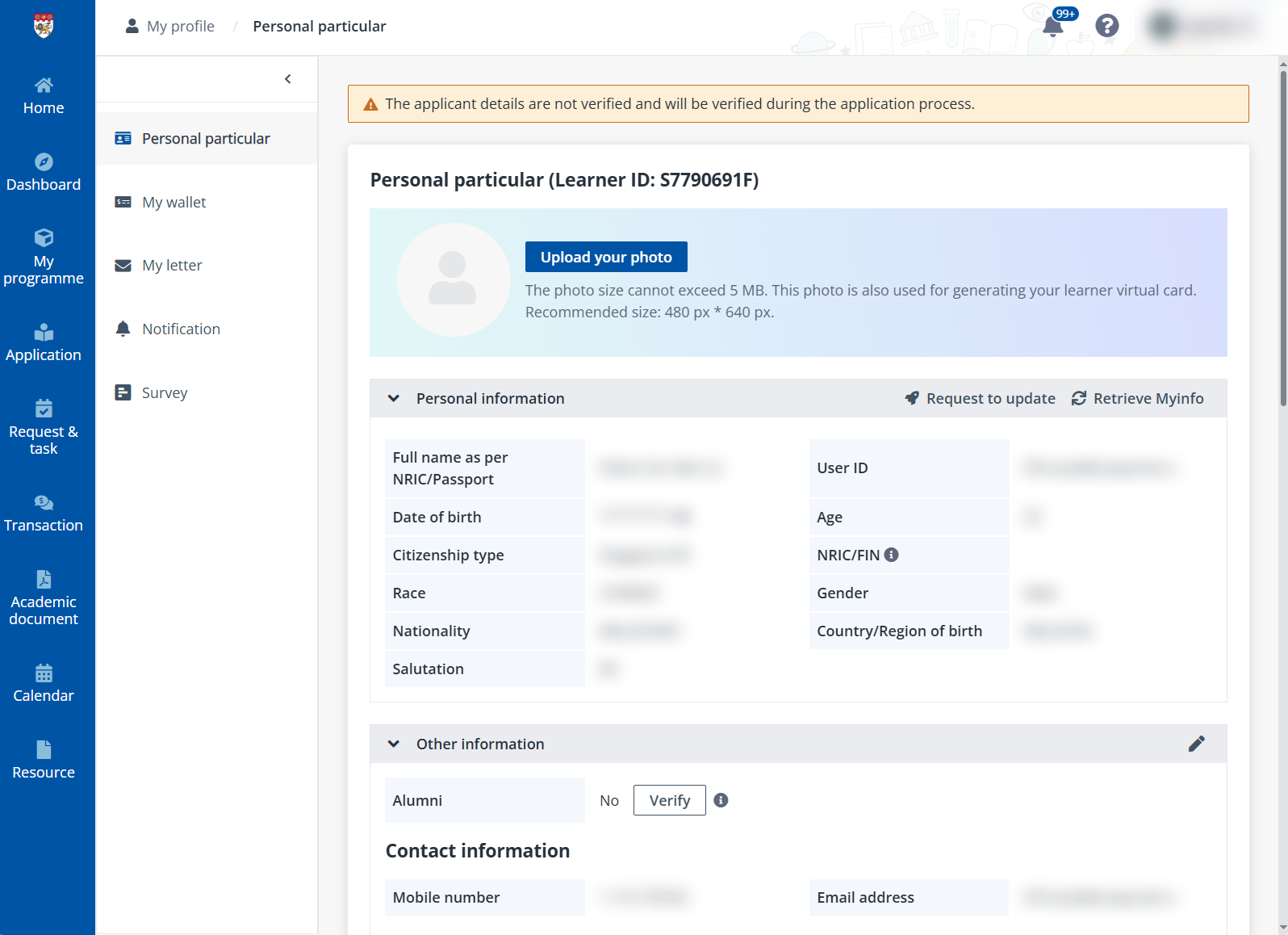
To update the personal information, click Personal particular in the left navigation, and then complete the following steps:
1. Click Upload your photo and upload a photo from your local device. The photo will also be used for the learner virtual card.
2. In the Personal information section, you can view your personal information. To update any information, click Request to update to send a request to update the personal information. You can also click Retrieve Myinfo to retrieve information from Myinfo.
Note the following:
•MOE educators must fill in official MOE email addresses to ensure the MOE subsidised fee usage for NIE courses.
•If you have applications which are in the process of enrolment, you will need to wait for the programme enrolment confirmation before requesting to update the personal information.
•If you have retrieved your information via Singpass and have your NRIC/FIN filled in, you will then be able to sign into the system via Singpass.
•NRIC/FIN can only be updated via retrieving the latest information from Myinfo.
3. To update other information including contact information, education qualifications, and working experience, click Edit.
•For alumni verification, ensure NRIC/FIN, mobile number, email and date of birth are updated and correct. Then, click Verify in the Alumni field.
Note the following:
o The Verify button can only be used once every 24 hours.
o Associate alumni are not eligible for alumni course credit.
•In the Contact information section, you can edit the contact information.
•In the Education qualifications section, complete the following steps to add your education qualifications.
i. Click Add education qualification.
ii. Fill in the information of the education qualification and click Save.
iii. In the Supporting documents field, upload the certificates, transcripts, or syllabus from your local device.
•In the Working experience section, complete the following steps to add your working experiences.
i. Click Add working experience.
ii. Fill in the information of your working experience and click Save.
iii. In the Supporting documents field, upload your relevant certificates or other supporting documents.
4. After you finish updating the personal particular, click Save.